Clear your tangled cord organizer drawer by matching cables to devices, tossing damaged wires, and keeping only the spares you actually need.
What to do with a drawer full of old cords and chargers
Written up by Margo Lockridge
5 minutes to read

Empty your entire drawer of tangled cables onto a large table to untangle the knots and separate the wires you actively use from the mystery cords. You can quickly toss the damaged pieces, match the remaining cables to your electronics, and install a simple cord organizer to keep the necessary spares separated and ready to grab.
Match every cord to a device you still own
Gather your electronics from around the house and bring them to your sorting table. Pick up each cord individually and plug it into a compatible device to verify the connection fits securely and actively charges the battery. You will find old chargers that belong to electronics you no longer own, alongside standard cords that fit nothing in your home.
Group the compatible charging cables and power cords into a keep pile, and push the unidentifiable wires into a separate discard pile. Mark each matched cable with a small label that says what it powers. Fold a strip of masking tape around the wire near the plug, pressing the sticky sides together to form a flat tag.
Write the device name directly on the tape with a dark pen to instantly identify your electric razor or portable speaker charger. This straightforward labeling step stops you from repeating the guessing game the next time you empty the drawer.
Toss any cord that is frayed, cracked or damaged
Inspect the entire length of every matched cable in your keep pile for physical wear. Bend the wire gently near the plug to check if the outer rubber jacket is pulling away from the hard plastic base. Run your fingers down the cable to feel for permanent kinks, flattened sections, or spots where the inner wire casing shows through.
The CPSC advises replacing any cord that is frayed, cracked or otherwise damaged, because damaged cords may have exposed live wires that can be shock and fire hazards. Stop using any power cable that fails your visual inspection and replace it.
Replace a split extension cord rather than patching it, and set the old one aside for recycling so nobody else can plug it into a wall socket.
Keep one spare of each cable type you actually use
You rarely need several identical charging cables for one device. Look through your keep pile and pull out the duplicate cables and power bricks. Pick out the primary cable you use to charge the item daily, checking its length and flexibility.
Select one spare of the same connection type that fits snugly into the charging port, adding it to your permanent keep pile. Place every remaining duplicate wire into your discard pile for donation or recycling.
Limiting your drawer to one active cord and one reliable spare stops the cables from tangling together and saves space.
Keep outdoor extension cords apart from indoor ones
Thick extension cords consume massive amounts of drawer space and belong in a different part of the house. Sort through the power cords in your keep pile and separate the heavy outdoor extension cables from the thin indoor power strips. Check the markings on each long cord for wording that says it is made for outdoor use, and use only cords marked that way outside.
The CPSC says extension cords made for indoor use will not withstand outdoor temperature, humidity and wear and could become fire or shock hazards when used outdoors. Store your dedicated outdoor cords on heavy wall hooks in your garage or shed where you store your yard tools.
Keep only the light indoor extension cords and standard power strips in your indoor cord organizer, since these fold up smaller.
Coil each cord loosely and unwind it fully before use
Wrap each kept cable in a loose circle and secure it with a basic hook and loop tie so it stays folded in the drawer. Avoid wrapping the wire tightly around a power brick or bending it sharply at the plug base. A cord wrapped tightly around a brick can trap heat, while a loosely coiled wire is easier to unwind when you need it.
Unwind the entire length of the wire before you turn on the power for a laptop or similar device. The CPSC warns that a cord tightly wrapped around an object traps heat that would normally escape, which can melt or weaken the insulation.
Letting the cord lie loose, out of foot traffic and not under a rug, helps heat escape instead of building up. After you finish charging the device, gather the wire back into a loose circle and secure the strap.
Sort the keepers by type in small boxes or a divided tray
Measure the interior width, depth and height of your empty drawer with a tape measure before buying any storage inserts. Purchase an acrylic cord organizer tray that features fixed compartments to trap each coiled wire in its own specific zone. This setup lets you pull a single phone charger out without dragging a tangled knot of wires along with it.
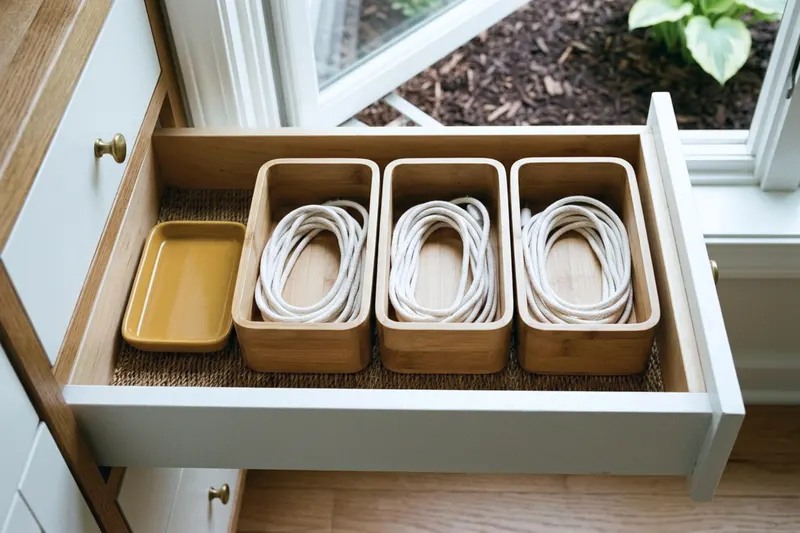
You can also arrange small cardboard boxes inside the drawer to create separate compartments for free. Group your matching connection types together in the same row of boxes, placing your daily tablet chargers near the front. If your setup shares space with a junk drawer that will not close, keep the loose items completely separated from the folded wires.
Lay the larger laptop power bricks and coiled indoor extension cords flat in the remaining open space. That keeps the heavy hardware from jamming against the top frame when you open the drawer.
Donate or recycle what is left instead of trashing it
Gather the undamaged duplicates and unidentifiable wires from your discard pile to clear off your sorting table. These specific cables serve no purpose in your house, but used electronics are better donated or recycled than trashed. The EPA says manufacturers and retailers offer several options to donate or recycle used electronics.
Place the functional spares into a small bag and drop them at a local thrift store or a charity donation center. Some thrift stores and charity centers accept working cables, so call ahead to ask.
For the unidentifiable wires that no longer match any household device, contact the original manufacturer or ask at the customer service desk of a local electronics retailer. Ask the retailer or manufacturer whether it offers a take-back or recycling option.


